
Local bulletins for hyperlocal asks and offers
Post a quick ask or offer within a few blocks—each bulletin expires in 30 minutes so you only see what is happening right now.
Bulletins are only available in the Wyrl app—post, browse, and join from your phone. Download Wyrl for iOS or Android to see what's live around you.
Download Wyrl on the App Store or Google Play to get the app →
A bulletin is a quick ask or offer you post in the Wyrl app—ride to the after-party, spare ticket at the door, coffee before the next session. It goes live immediately and expires in 30 minutes so every post you see is happening right now.
At a conference, bulletins are how you split an Uber from the hotel, sell a GA ticket someone needs at the entrance, or find a hand with gear between sessions—without shouting into a group chat that half the attendees are not in yet.
How local bulletins work
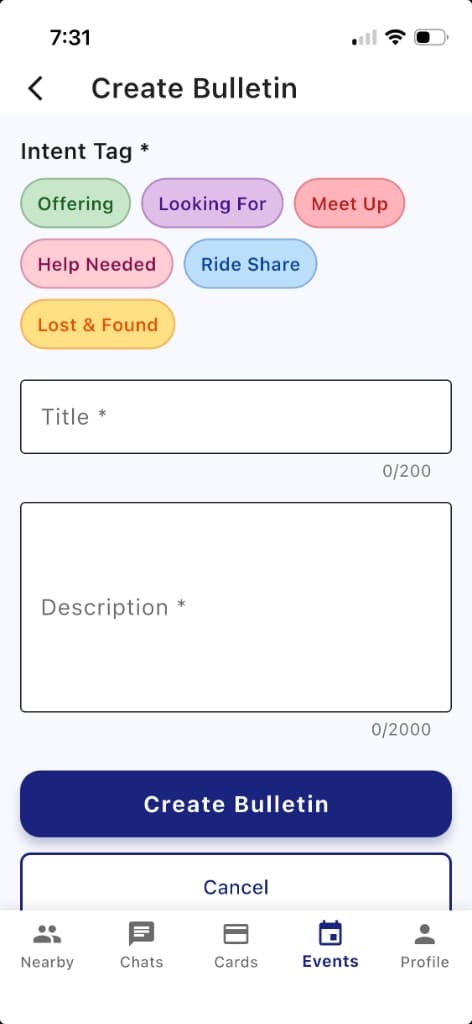
In the Wyrl app, pick an intent tag (Ride Share, Looking For, Meet Up, Help Needed, Offering, or Lost & Found), add a title and description, and post. Only people within a few blocks of where you posted see it—ideal for rides, tickets, or neighborhood notifications.
- Live immediately—post when the need is now, not for later.
- Hyperlocal only—only people within a few blocks of where you posted can see it.
- Expires in 30 minutes—so the feed stays urgent and relevant, not a graveyard of old asks.
- Fixed location—stays where you posted; it does not follow you around the venue.
Download Wyrl on the App Store or Google Play to post a bulletin →
Create a local bulletin in the Wyrl app
Bulletins are app-only so location and timing stay accurate for neighborhood ride shares and last-minute asks.
Choose an intent tag, write a clear title and description, and tap Create Bulletin.
- Offering
You have something to give—feedback, a spare ticket, extra hands.
- Looking For
You need something now—a ride, a ticket, a quick intro.
- Meet Up
Coffee before the keynote, walk to the after-party together.
- Help Needed
A five-minute favor—carry gear, watch a bag, quick booth help.
- Ride Share
Split an Uber to the venue, hotel, or after-party while you are still nearby.
- Lost & Found
Badge, laptop, lanyard—lost or found within walking distance.
Local bulletin examples
Real-world asks and offers—professional, social, or practical.
Ride to the conference
Ride ShareHeading to the venue in 20 minutes—have one seat, split an Uber from downtown.
Extra ticket at the door
Looking ForAnyone have a spare GA ticket? I am at the west entrance now.
Offering design feedback
OfferingUX designer with 30 minutes—happy to glance at your portfolio nearby.
Coffee before the session
Meet UpGrab a quick cup before the 9am keynote if you are in the lobby.
Lost badge
Lost & FoundBlue lanyard with Wyrl sticker—lost near registration five minutes ago.
Help carrying gear
Help NeededNeed a hand rolling one crate to Hall B—five-minute favor.
Download Wyrl on the App Store or Google Play to respond to bulletins nearby →
Common questions
What is a bulletin?
A short post for something you need or are offering right now—like a ride, a spare ticket, help with gear, or a quick meetup. It goes live immediately and disappears after 30 minutes.
What can I post?
Anything immediate and local: ride shares, looking for or offering help, meetups before a session, lost items, and similar asks. Pick an intent tag so people know what you need.
Who sees my bulletin?
Only Wyrl users within a few blocks of where you posted.
How long does a bulletin last?
30 minutes from when you post it, then it expires automatically so the feed stays current.
Does the location move if I walk away?
No. The location stays where you posted. Popup events work the same way—they stay in the nearby list at that spot and do not move if you leave.
How is a bulletin different from a popup event?
A popup is a short gathering you host for up to two hours (“join me for coffee”). A bulletin is a one-line ask or offer that expires in 30 minutes.
Can I message the bulletin creator on the app?
Yes. Open a bulletin in the Wyrl app to see its details and message the person who posted it. That is the only way to respond—there are no public replies or comments on bulletins.
Ready to try it?
Download Wyrl, post a bulletin when you need something now, and see who responds nearby.
Also on Wyrl nearby
Popup events — host a short gathering for up to two hours