
Instant popup events for spontaneous local meetups
Start a short-lived gathering and reach people within a few blocks—professional, social, or both.
Popup events are only available in the Wyrl app—post, browse, and join from your phone. Download Wyrl for iOS or Android to see what's live around you.
Download Wyrl on the App Store or Google Play to get the app →
A popup is a spontaneous gathering you start in the Wyrl app—coffee with founders after a talk, a quick coworking block, or a pickup game. It shows up in the nearby popups list for people within a few blocks and runs up to two hours.
Whether you are at a hackathon, a conference after-party, or you just spotted a cluster of engineers at the coffee shop—popups are how you turn “anyone want to…” into people actually showing up.
How popup events work
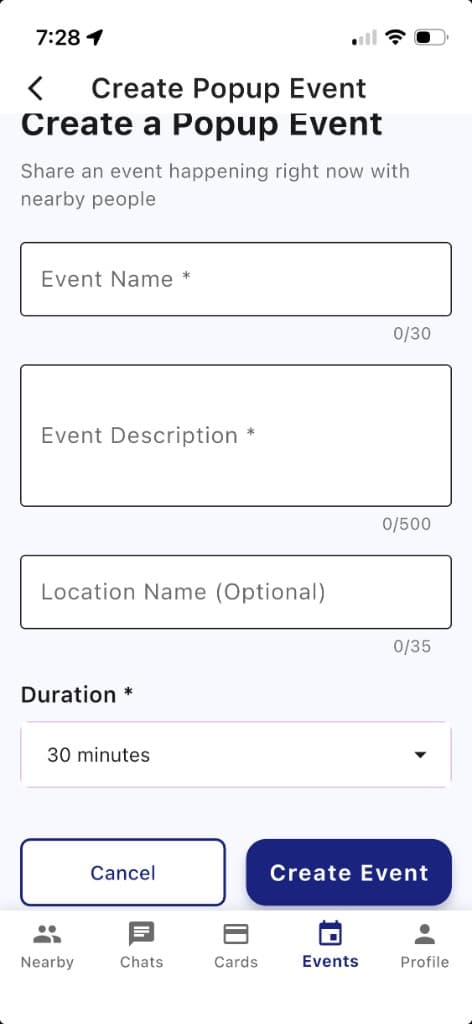
In the Wyrl app, add a name, description, and optional location label (for example, a café or conference hall). Nearby people see your popup in the popups list right away—no advance scheduling.
- Live the second you post—no scheduling lag when the moment is now.
- Only people nearby see it—your invite reaches the few blocks around you, not the whole city.
- Short by design—up to two hours, often 30 minutes for a coffee or portfolio chat, so it stays casual.
- Stays where you started it—the popup remains at that spot in the list even if you step away (same as bulletins).
Download Wyrl on the App Store or Google Play to open Wyrl and start a popup →
Create a popup event in the Wyrl app
Popup events are created only in the Wyrl mobile app so your location and timing stay accurate in the nearby popups list.
Pick a duration from 30 minutes up to two hours, write what is happening now, and invite nearby people to join.
Popup event examples
Real spontaneous meetups from the tech and startup crowd—professional, social, or both.
Pickup game
SocialNeed one more for basketball at the park—join if you are nearby.
Conference booth moment
ProfessionalStop by our booth for a quick demo and meet the team in person.
Chess in the café
SocialLooking for someone to play a casual game while I am here.
Coffee & conversation
ProfessionalOpen invite for a 30-minute chat with founders in the area.
Study sprint
SocialQuiet co-working for the next hour—tap in if you want a seat.
Ask me anything
ProfessionalProduct designer at this meetup—happy to review portfolios nearby.
Download Wyrl on the App Store or Google Play to join popups nearby →
Common questions
What is a popup event?
A short gathering you start right now—coffee with founders, a quick coworking block, a pickup game, and similar. It goes live immediately in the nearby popups list and lasts up to two hours.
Who sees my popup?
Only Wyrl users within a few blocks of where you posted. Popups show in the app’s nearby list (not on a map view).
How long can a popup run?
Up to two hours. You pick the length in the app (many people use 30–60 minutes); it ends automatically when time is up.
Does the location move if I walk away?
No. It stays tied to where you posted and keeps showing in the nearby list at that spot. Moving around does not move it (bulletins work the same way).
How is a popup different from a bulletin?
A popup is a gathering you host for up to two hours. A bulletin is a quick ask or offer that expires in 30 minutes.
Can I message the popup creator on the app?
Yes. Open a popup in the Wyrl app to see its details and message the person who posted it. That is the only way to coordinate—there are no public replies or comments on popups.
Also on Wyrl nearby
Bulletins — post a 30-minute local ask or offerReady to try it?
Open Wyrl, start a popup when you are on the ground, and see who shows up nearby.